BOB-4 Video OSD / On Screen Display Modules

BOB-4-H Video Character Generator & Graphics Overlay Module; OSD Module

  BOB-4-S Video Character Generator & Graphics Overlay Module; OSD Module

BOB-4 is Decade's fourth-generation low-cost video information overlay module, now available in a rugged 2x20 header connector format with an industrial temperature option as well as the original 30-pin SIMM format. BOB-4 lets your microcontroller or PC display text and vector graphics on standard TV monitors. With large user-definable character sets, BOB-4 also supports bitmap graphics and multiple languages. BOB-4 generates background video on-board, or automatically genlocks to your video source and superimposes characters over the image. Printable characters and commands drive BOB-4 through fast SPI or RS-232 style data links, much like a serial terminal or printer. BOB-4 links directly to most microcontroller chips and modules, including the BASIC Stamptm. NTSC and PAL video standards are supported in a single hardware version. Field firmware upgrades are supported via PC connection. Please visit our Order page for small-quantity price information on all versions.
Here's a demo screen capture showing some of BOB-4's display capabilities.
Key Features:

The BOB-4 Conscriptor PC program is provided without charge to assist customers with BOB-4 configuration. See download link below. The BOB-4 Conscriptor runs on Windows XP machines and offers these conveniences:

[Dividing Line Image]

Suggested Applications
[Bullet] Remote Video Inspection & Test [Bullet] Industrial Process Monitor
[Bullet] Scientific Experiment Monitor [Bullet] Home Automation
[Bullet] Remotely Piloted Vehicles [Bullet] Robotics
[Bullet] Teleoperated Mechanisms [Bullet] MATV ~ Pay TV
[Bullet] CCTV Security & Surveillance [Bullet] Electronic Signs
[Bullet] Information Display [Bullet] ATV ~ Amateur TV
[Bullet] Dumb Serial Terminal [Bullet] Motor Racing
[Bullet] UAV ~ R/C Aircraft [Bullet] Law Enforcement

[Dividing Line Image]

BOB-4 Specifications

Physical

BOB-4 is now available in two form factors. Both are nominally RoHS compliant (lead-free).

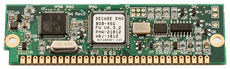
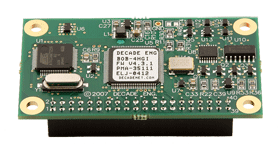
[1] BOB-4HG(I): Header connector format, 2.65 x 1.50 inches. Modules are provided with a 2x20 pin bottom-side female header connector intended to mate with a ‘short’ (.230”) male pin header on the host board. The mating header is a common .025” square post header with .100” pin spacing. Mechanical attachment requires four corner standoffs of 7/16” (.4375”) height. BOB-4H corner mounting holes are .125” ID, to clear #4 machine screws. Module weight is about 0.55oz/15.6g. Commercial (0~50C) and industrial (-40 to +85C, "I" suffix) operating temperature ranges are available.

[2] BOB-4SG: 30-pin SIMM format, 3.50 x 1.05 x 0.35 inches. Weight is about 0.35oz/9.8g. Commercial temperature range only; 0~50C.

Power Supply

BOB-4 requires +5VDC regulated within ±5% at 100~105mA typical. The power supply should be sized to accommodate 150mA or more, and protected against fault currents above 250~300mA. A low-current (10mA) auxiliary +3.3VDC regulated output is available. Auxiliary supply output current adds to main supply current drain.

Data I/O


The primary data path is asynchronous serial with BOB-3 compatible ‘standard’ rates of 1200, 2400, 4800, 9600, 19.2k, 38.4k, 76.8k, and 153.6k bits/S, using eight data bits, no parity, and one stop bit (8N1). The default rate is 9600. BOB-3 standard rates are selectable via pin strapping—see Pin Descriptions. 115.2kbps and synchronous (not yet tested) rates are also available. Arbitrary rates are selectable via software from 46bps up to 998.4kbps. Most other UART setup parameters are also subject to reconfiguration by command. Software (XON/XOFF) and hardware (RTS/CTS) flow control schemes are implemented, but use is not mandatory.

A debug serial port is provided. This port is hard-coded to run at 115.2kbps, 8N1, and no handshake.

An SPI interface is provided. The SPI port may be used for BOB-4 control (slave mode) or font memory expansion (master mode), but it cannot simultaneously serve both purposes.

Logic output specs conform to 3.3V CMOS standards, except pin 20 in the SIMM version. Logic output current is 8mA maximum except VMIS\ (16mA). Logic inputs are TTL-compatible (max logic low: 0.8V, min logic high: 2.0V) and 5V-tolerant (except ACR0~2), but hard 5V drive is not allowed during reset. The main RXD pin (and TXD) offers full 5V input tolerance, even during reset.

Two analog voltage inputs with zero to +3.3VDC maximum range are provided on BOB-4H only.

Print Speed

Small printable characters from internal fonts are normally written to display RAM within a few microseconds after the stop bit is received, so total print delay time is essentially that of the serial interface at low to moderate data rates (e.g. 521uS per character at 19,200 bits/S). BOB-4 can print more than 7,000 chars/S continuously, but large characters and graphic objects consume increased CPU time roughly proportional to screen area, potentially reducing this rate. Characters may not appear in the display until the next vertical scan cycle, depending on when they are written. If single-frame print timing accuracy is required, host data transmission activity should be triggered from the start of vertical blanking (logic output available) and display position should be near screen bottom. To assist in achieving smooth animation, BOB-4 can also message the host when vertical blanking begins.

Video I/O


BOB-4's video environment is RS-170A (NTSC) or PAL-B composite baseband, 1Vpp (±10%) 75 ohms unbalanced. Y/C video (S-Video) can be accommodated with external circuitry. The video input tolerates up to 2.5VDC bias mixed with incoming video. The video output contains a small DC bias (+1V), which is common to many video sources and is well tolerated at the inputs to most video equipment. A ‘local’ video signal (black background) is generated by default if video input is not supplied, but users can enforce genlock or local video modes. Video control and timing signals are available by software command at logic-level outputs.

Character Format


Character bitmaps can be of arbitrary dimensions up to 255x255, limited only by font storage space. 62kB of on-board flash memory is available for custom fonts (shared with bitmap graphics). External font space is defined by the size of available SPI memory chips. Proportional fonts are supported. Font depth can be one or two bits per pixel. 2bpp fonts support character outline and background features, but render as 1bpp if blinking is enabled. English fonts of assorted size and appearance reside in permanent 'system' memory. Only the BOB-3 look-alike font, which is the default font, currently includes European language support. New BOB-4 fonts can be created or imported and edited with the BOB-4 Conscriptor, a PC program supplied without charge by Decade Engineering.

In BOB-3 compatibility mode, 34 columns and 17 (NTSC) or 19 (PAL) rows of characters may be displayed on overscanning monitors. 40 columns are available if the full raster is used. 304 character patterns are provided as 12x13 pixel bitmaps, including upper & lower case, italics, European language support, and a set of graphics characters useful for lines, bar graphs, etc. The character set closely replicates that of BOB-3 prior to firmware version 4, including the default RAM font (but now it’s in flash memory).

Graphics

A set of vector graphics drawing commands is provided. See the Vector Graphics Commands section of the BOB-4 Application Guide for a full description and examples.

Bitmap graphics objects up to 255x255 pixels can be imported by the BOB-4 Conscriptor program and stored in BOB-4 user font memory space (flash). Limitations apply; see BOB-4 Conscriptor Help system for additional information. These objects are treated internally as a font with one character.

Display Features


Overlay resolution for square pixels is 320x240 in NTSC mode, or 384x288 in PAL mode. Higher pixel rates yield increased display density (up to 480 pixels/line). Only monochrome text and graphics are available. Characters are displayed by default in white with a thin halftone (reduced video intensity) outline. Halftone and black character cell backgrounds are optional, along with many other character rendering variations. In local video mode, a full-screen black matte background is automatically supplied. Blinking is selectable by character. “Mirror image” display reversal is available on command, beginning with firmware V4.2.16. Manual adjustment of overlay transparency (contrast) is optional, with external circuits. The text display window may be reduced to any desired portion of the screen. Vertical scrolling is automatic. A single crawl (horizontal scroll) message line can display up to 1024 characters sequentially without disturbing other display elements. The entire information display may be toggled on/off without affecting the contents of display RAM. Writing to display RAM is permitted with display on or off. A non-volatile boot script memory stores up to 900 (was 512 prior to V4.2.16) characters that may be used to configure BOB-4 and automatically generate a display at power-up time. The boot script memory has an endurance limit of 10,000 write cycles.

Notes:

The start-up display (boot script) memory can be loaded with commands as well as printable data, which allows BOB-4's operating modes to be semi-permanently configured for special applications. In some cases, this feature eliminates the need for a host computer or smart interface device. Read the BOB-4 Application Guide for additional details, or contact Decade Engineering to discuss your requirements.

Product specifications and prices are subject to change without notice. Contact Decade Engineering to confirm current status if any specification is critical to your application.

[Dividing Line Image]


BOB-4 Technical Support Materials

BOB-4 Application Guide (PDF):  The latest version is always available here. Adobe Acrobat Readertm is required.

BOB-4 Conscriptor (EXE):  PC (XP) program to manage BOB-4 fonts, configuration, boot scripts, and firmware upgrades.

UTF-8 Encoder (EXE):  A simple PC utility program that converts hex or decimal character codes into UTF-8.

C Code Example (TXT):  Includes a couple of hints on writing C programs to control BOB-4.

Solar Car Example (TXT): Fragments of the PIC18F C program from the University of Michigan's 2007 Solar Car project.

PBASIC Fonts Example (TXT): For Parallax BASIC Stamp II (BS2). Thanks to John Smith at Milford Instruments (UK dealer).

PBASIC Graphics Example (TXT): Also for Parallax BS2. Thanks again to John Smith at Milford Instruments!

ASCII Demo File (TXT):  This file was used to create the demo display linked near the top of this page. Transmit to BOB-4 with a terminal program, or store it in a boot script. Your browser might have trouble displaying this file due to embedded control codes.

Smart Encoder Interface (PDF):  SEI implements a quadrature distance encoder interface and user controls for BOB-4 in an Atmel AVR series microcontroller. Demonstrates BOB-4 control through the SPI port. AVR-GCC Source Code (ZIP) Object Code (HEX)

DragonOSD is an advanced First-Person-View (FPV) video information overlay system for radio-controlled aircraft that takes full advantage of GPS technology and controls BOB-4 through the SPI port. DragonOSD is an open-source project. Links to demo video, source code, and compatible flight hardware are available from Intelligent Flight in Australia. New Generation Hobbies in Canada (Ontario) now stocks BOB-4 modules and other hardware for this project.


FAQs

Where can I get the latest firmware upgrade file?

You must email an explicit request to Decade Engineering for this item. Please use the feedback link below.

Is BOB-4 a direct replacement for BOB-3?

BOB-4S (SIMM version) offers limited hardware compatibility with BOB-3. It mounts in the same 30-pin SIMM socket and uses the same pins for basic functions, except power supply. If the BOB-3 socket has +5V power applied to pin 3, and nothing more than basic video and data I/O connections are deployed, then BOB-4 may be directly compatible. In all BOB-3 applications where extended functionality has been implemented, it is necessary to conduct a careful review of pinout differences. Application software compatibility is also limited. A subset of BOB-3 commands is provided in BOB-4, but most customers should revise BOB-3 application programs to use the new BOB-4 command set.

Will BOB-4 work with my data source?

BOB modules behave much like printers or dumb serial terminals. It's often necessary to insert a smart interface between the data source and BOB module, because raw data rarely produces the desired display formatting. The smart interface could be a microcontroller module such as the popular Parallax BASIC Stamptm, or a microcontroller IC mounted alongside the BOB-4 socket on your host board. The choice of interface hardware is often determined by preferences of the person who will write the data processing program or 'print driver'. Many factors can influence the decision, including cost, serial communication support, CPU speed, development tools, package size & weight, power requirements, etc.

Sometimes it's reasonable to reprogram the microprocessor in your data source, and sometimes BOB-4 can be configured to handle the existing data stream directly. BOB-4 is configured via register settings, a boot script, and custom fonts, all saved in semi-permanent flash memory. Decade Engineering supplies a PC program to simplify the configuration process, but it's also possible to configure BOB-4 through direct use of its command protocol. See BOB-4 Conscriptor link above.


[Dividing Line Image]

Prices and Ordering Information

productsserviceslinksfeedbackorderdealerssearchhome