Sample BOB-I screen shot
This product is discontinued. Please see BOB-4
Physical Dimensions:
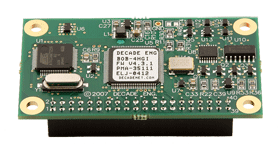
4.00"(L) x 2.20"(W) x 0.70"(H), weight approx. 1.5oz.
Mounting Holes:
4, in corners, .156" ID, .200" nearest board edge to hole center
Connectors:
.025" square post headers, .1" spacing, .3" pin length.
Power Supply:
+12VDC nominal (9~15V range), 80mA max., +5V regulated output.
Video Standard:
RS-170A (NTSC) composite baseband, negative sync.
Video I/O Level, Impedance:
1Vpp, 75 Ohm, unbalanced.
Video In Common Mode Range:
+10V, -8V (@ nominal supply voltage).
Character Format:
12 x 18 pixels, 240 maximum displayable (10 rows, 24 columns).
Character Display Options:
7 char colors, 8 outline/background modes, blink, size up to 4x.
Character ROM:
128 patterns, some character graphics, most alphanumerics use ASCII.
Data Path:
Serial (clock, data, chip select in, video detect out), TTL levels.
Data Rate:
2.5Mb/S max. (400nS min. bit clock cycle time).
Control Paradigm:
4 registers addressed as character cells (addresses auto-increment).
Notes:
All four mounting holes are connected to the PCB ground plane.
Use of color in 12x18 pixel (min. size) characters is not recommended in overlay mode.
The video detector output is functional only in overlay mode.
Specifications are subject to change without notice. Contact Decade Engineering to confirm current status if any specification is critical to your application.
If you purchase a BOB-I without the Developer Package, you may download materials from this site and fabricate your own interconnects.
![]()
More BOB-I Technical Information
C Language Demo Program:
Executable Code (EXE)
Source Code (CPP)
This demo runs on practically any DOS PC host. Like all of the BOB-I demo software, it requires a BOB-I board assembly to generate the video display.
The BOB-I C Demo software implements a simple video text editor. Upon successful startup, you will see a flashing white block cursor in the upper left corner of the video overlay. Characters typed on your PC keyboard appear at the current video cursor location. The cursor moves to the right as you type. It moves down and to the left end of each new line. Words don't wrap (they break). Your PC cursor keys work more-or-less as expected, and the backspace/rubout key does its job. F1 controls character color, but you must type a new character to see its effect. F2 controls the next character's blink attribute in similar fashion. F8 clears the overlay screen by writing blanks to all character cells.
Your PC screen displays a simple "Control Panel" that allows BOB's control registers to be edited on the fly. An underline cursor at the left edge of the screen marks the selected register bitfield. Move the cursor up and down the list with F3 and F5. It stops before reaching the last two items because they're handled by F1 and F2 (see above). Change the current register's contents with F4 and F6. If you don't supply a video signal to BOB for text overlay, you must select BOB's local video generation mode in this way before you will see a stable video display.
F7 rewrites the entire overlay memory with a color bar test pattern. This pattern isn't "standard" NTSC primaries & secondary colors. BOB's colors result from arbitrary subcarrier phase increments selected by the OSD chip. The pattern appears offset to the right of center because bar number one (color value = zero) is transparent, rather than black.
Parallax BASIC Stamp PBASIC Demo Software:
Source Code (TXT)
STAMP-II.TXT is Parallax PBASIC source code for developers who want to use BOB-I with BASIC Stamps. This heavily-commented text file is also an excellent source of information for assembly language developers, especially those who find C code difficult to read.
Visual BASIC for Windows Demo Software:
Visual BASIC (ZIP).
A simple Windows demo application for BOB-I. Spanish and English versions are included. Operation is self-explanatory. Like our C Language Demo, it uses the PC printer port to fake a serial SPI-style interface to BOB-I. It's a good example of what can be done in MS Visual BASIC. Source code is not provided, but further information may be available from the author.
Motorola Assembly Language Demo:
Device Driver (TXT) A BOB-I interface example in Motorola MC68HC11 assembly language.
Data cable (PDF) Termination list for BOB-I demo hook-up to PC printer port.
BOB-I Developer Notes (PDF) Complete BOB-I developer notes.
Character Transparency Control (PDF) Application note (schematic) for BOB-I.
BU5963 Data Sheet (1.15MB PDF) A scan of Rohm's IC data sheet. Defines the application programmer's interface to BOB-I and provides additional hardware details.